


Amtrak
4.317.44K Reviews
App Specs
- Version
- 6.1.7
- Updated On
- License
- Free
- Downloads
- 5,000,000+
- Developer
- Amtrak
- Categories
- Travel & Local
- Platform
- Android, iOS
Screenshots
 Analysis by AppCompare
I judge a train-travel app by what it helps me do when plans are still flexible and when they suddenly are not. The Amtrak app is at its best as a practical companion for trips on Amtrak: it brings booking, tickets, journey details, and account tools together, so I don’t have to treat every part of the trip as a separate task. It won’t replace a wider travel planner, but if I already know I’m taking an Amtrak train, keeping the essentials on my phone is genuinely useful.
Useful before you leave, not just at the station
Planning a rail trip often means comparing departure times, journey length, and stops rather than simply choosing the quickest route. The app’s schedule information gives me a place to review those details while I’m deciding. That makes it easier to weigh a direct journey against one with more stops, or to choose a departure that fits the rest of my day. I’d still check that a train’s timing works with any onward plans, but having the trip details together makes the first pass less scattered.
For a realistic example, imagine I’m arranging a weekend visit and need to coordinate a train with a ride to the station and a pickup at the other end. I can look at the available journey details, choose a departure, and keep the booking information accessible on the same device. If the schedule changes, having the app ready gives me a straightforward place to check the trip rather than searching through email while I’m trying to coordinate with someone.
One useful habit is to review the itinerary before travel rather than waiting until I reach the platform. Checking the departure, stops, and journey duration gives me a chance to notice whether I’ve allowed enough time for the station and any connection afterward. A train ticket does not solve every part of a door-to-door journey, so I treat the app as the rail portion of the plan and use other tools for local transport or lodging.
Where it sits among travel apps
Compared with a general travel app, this one has a narrower job: it is built around Amtrak travel, not around combining every airline, hotel, rental car, and local transit option into a single itinerary. That focus is a strength once I’m booking or managing an Amtrak trip, because the ticket and rail details are close at hand. It is also the reason I wouldn’t use it as my only planning tool for a complicated trip with several transport providers.
For broad route discovery, I’d start with a map or a travel search tool if I were still deciding between train, bus, car, or plane. Once I’ve settled on Amtrak, the dedicated app is the more natural place to handle the rail booking and keep the ticket available. This division of labor is worth knowing: it avoids expecting a carrier app to act like a universal trip organizer, while still making the app valuable for the part it handles.
Small choices that make a trip easier
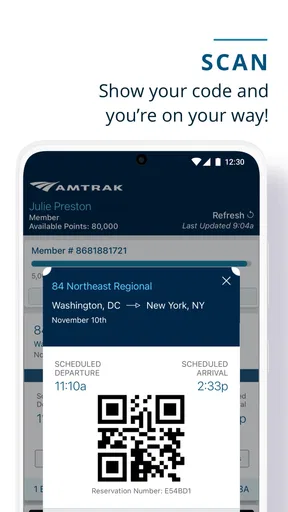
I find it helpful to think through ticket access before leaving home. The app’s e-ticket option means I can pull up the ticket on my phone instead of relying on a paper copy, but that convenience depends on having the phone available when it’s needed. I’d open the ticket before boarding, make sure the device has enough charge for the journey, and keep the booking details somewhere accessible. That tiny bit of preparation is more useful than discovering I need to sign in or search for the right screen while joining a queue.
Worth Reading Before You Choose

EA SPORTS FC Mobile 26 Is a Bigger Football Game, but It Takes Time

Flipboard Shows What News Apps Must Do Beyond the Feed

Switching to Android Auto Means Rethinking Your Driving Routine

Google Calendar Makes a Crowded Week Easier to Manage

Ludo King Makes the Most of the Minutes Between Plans

Baby Panda World Brings Quick Play to Modern Phones, but Its Game Library Feels Busy
Travel companions add another practical wrinkle. If I’m coordinating a trip with someone else, I’d agree in advance who is keeping the booking details handy and how we’ll communicate if plans shift. A shared plan is easier to manage when everyone knows the departure and station, even if only one person handles the ticket in the app. For a solo trip, the same idea applies to pickups: send the relevant timing to the person meeting me rather than assuming they can see my itinerary.
The app also connects with Amtrak Guest Rewards, which makes it more relevant to returning travelers than to someone taking one isolated journey. If I already use that account, having it available alongside travel tasks is convenient. If I don’t care about reward points, I can simply focus on the booking and trip information; the rewards element is an extra, not a reason everyone needs to install it.
Who should use it—and who may not need it
I’d recommend it to people who regularly travel on Amtrak and to occasional riders who want the booking and ticket close at hand. It can also suit someone planning a one-off trip who prefers handling travel on a phone, especially when keeping an eye on trip updates matters. The app is free, developed by Amtrak, and sits in the travel-and-local category. It is rated for Everyone; its 4.3 average comes from around 45,000 ratings, and it has been installed over 5 million times. Those figures suggest it is widely used, though they don’t guarantee that every trip or device will feel equally smooth.
I’d skip it if I rarely take Amtrak and don’t need a mobile ticket or account access, or if what I really want is an app that compares multiple transport companies and builds a complete door-to-door itinerary. A browser or general travel planner may be enough for that kind of research. The right choice depends less on how many tools an app offers and more on whether Amtrak is a meaningful part of my travel plans.
Your Ultimate Travel Companion
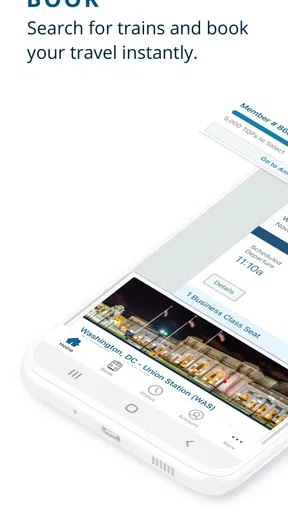
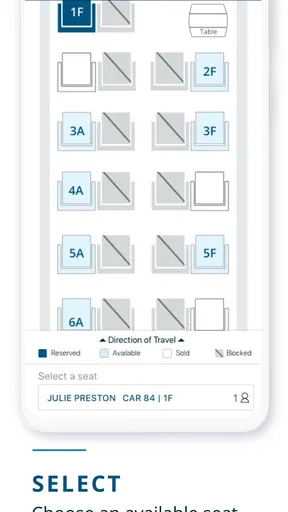
First off, let’s talk about the user interface. The Amtrak app is sleek and intuitive. You know that feeling when you open an app and everything just makes sense? That’s exactly what happens here. Finding and booking your train is as easy as pie. You can search for routes, select your seats, and even snag some sweet deals with just a few taps on your phone.
Real-Time Updates and Notifications
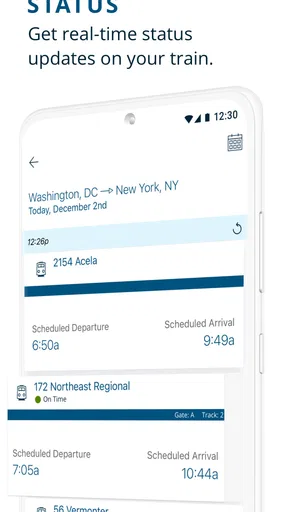
One of the standout features is the real-time updates. Imagine you’re rushing to the station, worrying about missing your train. No worries! The app sends you notifications about any delays or track changes. It’s like having a little train guru whispering updates in your ear. This feature is a lifesaver, especially for those of us who are perpetually running late.
Even with alerts, I wouldn’t treat a notification as a substitute for looking at the station information when I arrive. Updates are most helpful when I allow them to change what I do—leaving more time, contacting the person meeting me, or adjusting an onward plan—rather than simply reading them and carrying on as if nothing has changed. If the timing is important, keeping notifications available and checking the trip status as the departure approaches is a sensible routine.
Easy Navigation and Booking
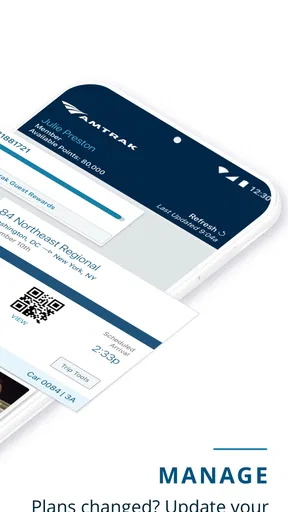
Navigating through the app is a breeze. There’s a clear menu that guides you through booking, checking train status, and even accessing your e-tickets. Speaking of e-tickets, gone are the days of fumbling with paper tickets. Just pull up your ticket on the app, and you’re good to go. It’s efficient and eco-friendly.
That said, a phone-based ticket makes the phone part of the boarding plan. I’d avoid starting a long travel day with a nearly empty battery, and I’d check that I can reach the ticket before heading to the platform. This matters most when I’m traveling with a tight connection or in a busy station, where stopping to troubleshoot is stressful. Anyone who strongly prefers paper or does not want to depend on a phone may find the app less convenient, even though digital access is a clear benefit for many riders.
Perks and Extra Features
The app doesn’t just stop at booking. You can also manage your Amtrak Guest Rewards account right from the app. Collect points as you travel, and redeem them for discounts or upgrades. Plus, if you’re a foodie like me, you’ll appreciate the dining options available on board, which you can preview in the app. Bon appétit!
Those extras are most useful when they answer a question I already have: whether my rewards account is associated with the trip, or what dining choices might be relevant to my journey. I wouldn’t choose a train solely on the basis of an onboard menu or assume that every trip has the same dining experience. I see these tools as convenient trip context, while the core value remains being able to manage the rail journey without switching between unrelated tasks.
For those who love planning, the app offers a comprehensive schedule of all routes. You can easily see the duration of trips, the number of stops, and even view the train layout. It helps in planning your journey to the T.
That planning information is useful, but I’d use it to make a better decision rather than treating every displayed detail as a promise that the whole journey will unfold exactly as expected. Stops and duration help me compare options; the train layout can help me picture the trip before I go. For connections beyond the train, I still leave room for the practical realities of getting through a station and reaching my final destination.
Final Thoughts
In a nutshell, the Amtrak app is a must-have for anyone planning to travel by train in the U.S. It’s packed with features that make traveling smoother and more enjoyable. Whether you’re a tech-savvy millennial or someone just looking for a convenient travel solution, this app is worth downloading. So, next time you’re planning a trip, give it a whirl. You might find yourself wondering how you ever traveled without it!
My recommendation is strongest for riders who want one dependable place to book and manage Amtrak travel, not for people seeking a universal travel dashboard. The developer is Amtrak, and the app is free, so trying it for an upcoming rail trip is an easy decision if its focused role fits your needs. It was released in 2012 and its current version is 6.0.9; it supports devices running Android 8.0 or later. If you’re choosing between installing it and relying on a broader planner, I’d use the broader tool to compare a whole trip and this one for the Amtrak-specific work. That balance is what makes it useful without asking it to do a different app’s job.
Pros
- User-friendly interface for easy navigation.
- Real-time train status updates available.
- Option to purchase tickets directly in-app.
- Interactive route maps for trip planning.
- Loyalty program integration for frequent travelers.
Cons
- Limited offline functionality.
- Occasional app crashes reported.
- Some features require internet access.
- Limited payment options available.
- No customization for notification alerts.
FAQs for Amtrak
What is the main function of the Amtrak app?
The Amtrak app is designed to provide users with a seamless travel experience by allowing them to book train tickets, check train schedules, and manage their reservations. It also offers real-time updates on train status and delays, ensuring that travelers have all the information they need right at their fingertips.
Can I use the Amtrak app to modify my travel plans?
Yes, the Amtrak app allows users to modify their travel plans directly through the app. You can change your reservations, adjust travel dates, or upgrade your seat. However, certain changes may incur fees or be subject to availability, so it’s essential to check the app for specific details related to your reservation.
Does the Amtrak app offer any discounts or promotions?
The Amtrak app often provides users with access to exclusive discounts and promotions. These can include reduced fares for students, seniors, or frequent travelers. It's a good idea to regularly check the app for any current offers or to sign up for notifications to stay informed about new promotions.
Is the Amtrak app available on both Android and iOS?
Yes, the Amtrak app is available for download on both Android and iOS platforms. Users can find it on the Google Play Store for Android devices and the Apple App Store for iOS devices. Both versions offer similar features, ensuring a consistent experience across different operating systems.
How does the Amtrak app handle boarding passes and ticketing?
The Amtrak app provides users with the convenience of mobile ticketing. Once you book a ticket, you can access your boarding pass directly within the app. This digital pass can be scanned at the station, eliminating the need for paper tickets and streamlining the boarding process.


